
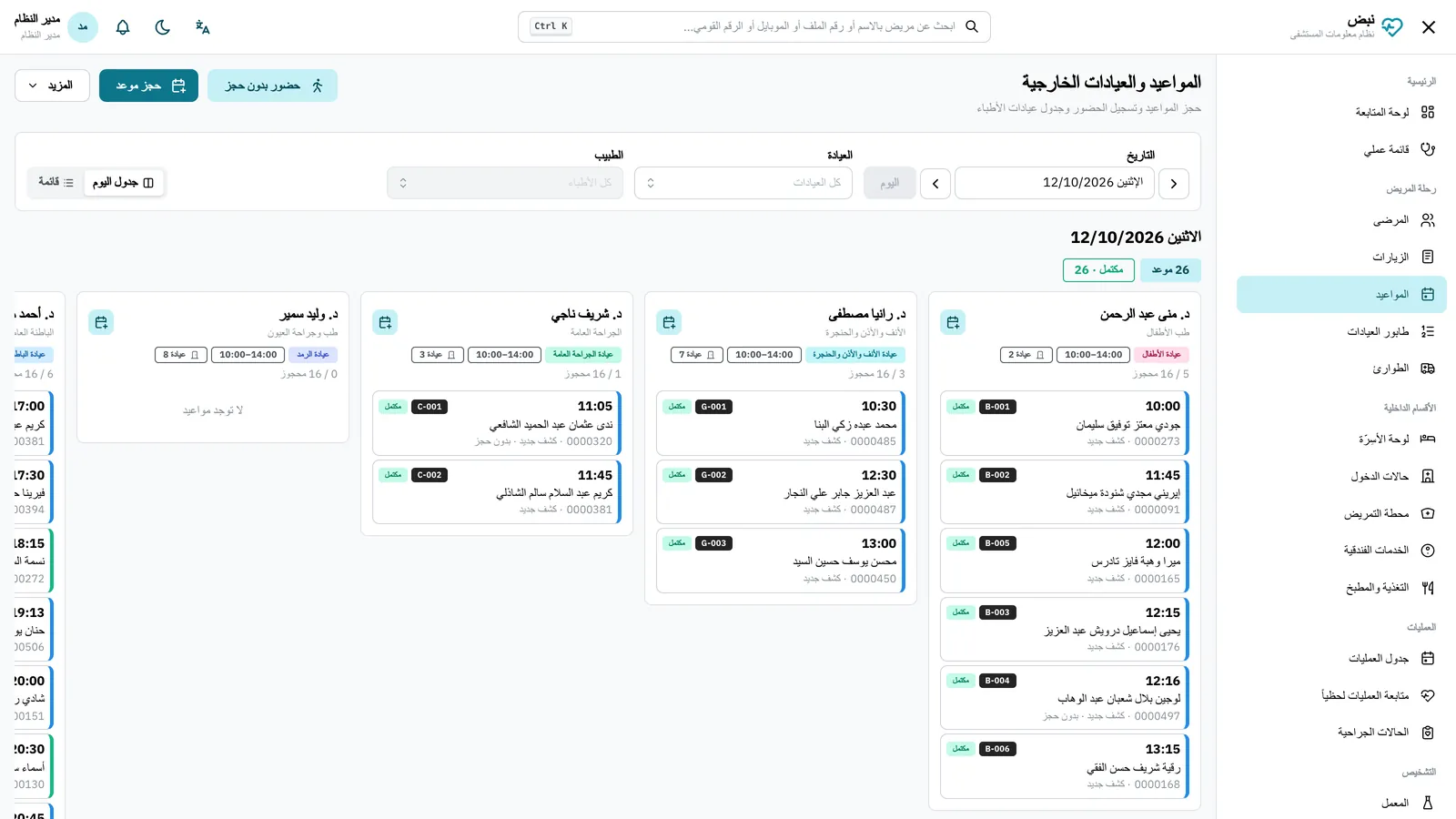
From booking to the call screen
Each doctor has sessions per clinic. Reception books, reschedules and overbooks within the rules you set, and free follow-up visits are part of the booking rules. On arrival the patient gets a daily queue number, and the call screen in the waiting area updates the moment the doctor calls the next patient. SMS reminders reduce no-shows.
The visit: notes, diagnosis and prescription
- SOAP notes with templates and bilingual ICD-10 diagnoses.
- Lab and radiology orders and order sets, with the results back in the same file.
- E-prescriptions checked against allergies, drug classes, interactions and duplicate therapy.
- Referrals, signed consents and medical reports, ready to print.
Cashier and insurance at the front desk
Every service is priced from the patient's payer price list, and the patient share and the insurer share are split before the patient reaches the cashier. Payments can be split over seven methods, including cash, card, InstaPay, mobile wallets and Fawry. Deposits, refunds and cash shifts with an X and Z report are built in, and insurance approvals follow the patient through the visit. The details are on the billing and insurance page.
Doctor fees without spreadsheets
Doctor fee rules can be a percentage or a fixed amount per service. Fees accrue automatically when the service is billed, and payouts deduct withholding tax with the data for Form 41, so the monthly doctor statement no longer depends on a spreadsheet kept by one person.
Pharmacy and stores in the same system
The prescription written in the clinic appears in the pharmacy queue. Dispensing follows batches and first-expiry-first-out, over-the-counter sales use the same stock, and purchasing, receipts and counts keep the balance right. See pharmacy and inventory management.
A patient app for booking and results
Patients sign in with their mobile number and an SMS code, without passwords, and see their family members’ files too. They book with the same rules as reception, follow verified lab results and final imaging reports, download prescriptions and discharge summaries as PDF and see their bills. The app is built for iOS, Android and the web; it is not yet published in the app stores.
Standalone, or on Odoo 19
Medical centres that already run Odoo can choose Nabd on Odoo 19: patients are Odoo contacts, physicians are employees, appointments live in Calendar, patient and insurer invoices and doctor fees in Accounting, and pharmacy dispensing in Inventory with lots and expiry. Centres that want one dedicated system choose Nabd HIS, which can later grow with emergency, wards and theatres on the same data.