
One financial pipeline from the first service to the final accounts
Most of the revenue a hospital loses is lost between departments: a test done but never billed, an approval that expired, a price typed by hand. In Nabd every clinical module captures its own charges through one pricing engine. The price comes from the price list of the patient’s payer, the patient share and the payer share are split at capture time, and the charge waits on the patient account until it is invoiced.
Issuing an invoice posts the revenue to the general ledger by service category; receiving a payment posts to the cash box, card clearing, wallet clearing or bank account, depending on the method. Doctor fees accrue automatically from the rules you set, and stock issued to a department posts its cost to that department. Finance stops chasing figures and starts reviewing them.
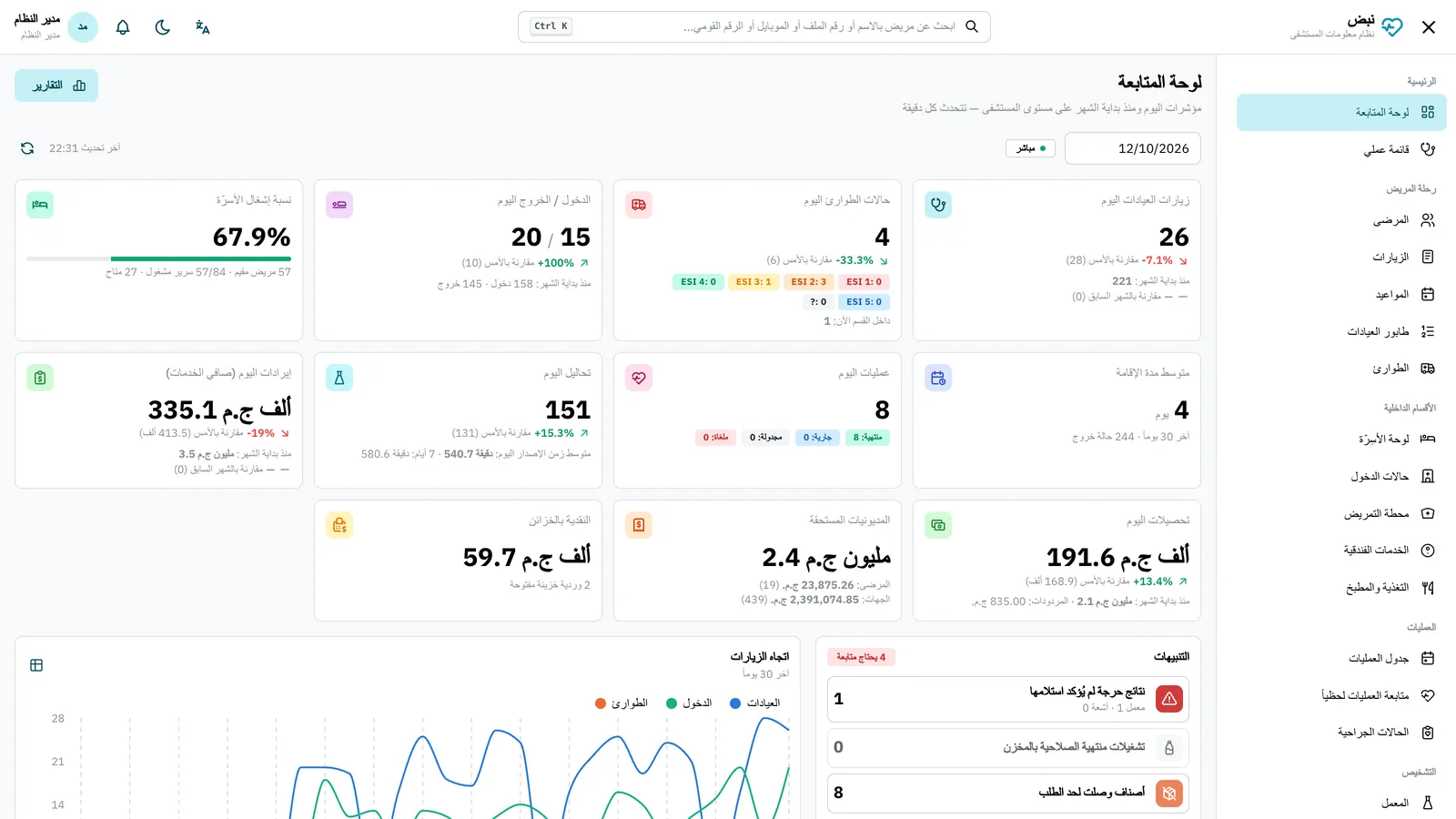
What management sees every day
- Today's and month-to-date figures: clinic visits, emergency cases, admissions, bed occupancy and average length of stay.
- Revenue, collections, patient and payer receivables, with aging per payer.
- Clinical and financial reports with filters and charts, CSV export and printing.
- Trial balance, profit and loss and balance sheet, with drill-down from any figure to the source document.
Boards for beds, emergency, theatres, clinic queues and the pharmacy queue update in real time, so a manager walking the floor and a manager reading the dashboard see the same picture.
Stores, purchasing and the value of stock
Pharmacy and general stores share one stock engine: purchase orders and goods receipts, transfers and requisitions between stores, blind counts and adjustments. Batches and expiry dates are tracked on every movement, issue follows first-expiry-first-out, and expired batches cannot be issued. Stock is valued at moving average cost, and every issue posts its cost to the consuming department. More on the pharmacy and stores page.
People, rosters and quality
- Staff files with practice-licence expiry alerts, a duty roster with conflict rules and leave requests with employee self-service.
- Incident reporting for every staff member, with an anonymous option, sentinel-event clocks and root-cause analysis.
- Patient complaints and suggestions routed to the quality office.
- Medical equipment register with automatic preventive-maintenance work orders, a calibration schedule and fault reporting.
Control: roles, audit trail and sessions
Access is granted through roles built from 83 permissions. Nobody can grant a permission they do not hold, role changes take effect at once, and sessions can be revoked immediately. Every change is recorded with the user, the time and the fields that changed, and a patient access report shows who opened a given record. These controls are built to support GAHAR information-management requirements and the Egyptian Personal Data Protection Law (PDPL 151/2020); accreditation itself is granted to the hospital, not to software.
On your own server, with your data in your hands
Nabd is installed for each hospital on its own server inside the hospital or on a dedicated server chosen with you. It is not a shared subscription service. The data belongs to the hospital: a full export of every table and stored file is available in every licence state, and even if a licence lapses, records stay visible, printable and exportable, and the emergency department keeps working. Read more in on-premise or cloud for hospital data.
How Nabd is implemented
- A demo on fictional data, focused on the departments that matter to you.
- Discovery and configuration: departments, price lists, payers, roles and the chart of accounts.
- Data migration from Excel or CSV: patients with their old file number, items, payers, opening stock and opening balances.
- Training per role and go-live support by the Flexcode Systems team.